It’s been a week since I returned from the Kodiak wilderness, wrapping up a whirlwind year of fishing adventures. I’m not sure whether there’s some subliminal voice telling me I need to get all these trips in before I’m too old to go, or whether working just two days a week has given me entirely too much free time to plan fishing trips a year in advance. Probably a little of both. Either way, I’m not hanging up the fly rods for the year. I’m just staying a little closer to home. San Luis Reservoir and the O’Neill Forebay will keep me occupied, I’ve got Bidwell coming up in a couple of weeks, and I might even squeeze in some redfish fishing when I visit my daughter in Charleston this December. She’s pregnant with my third grandson, which means I’ll soon have more grandchildren than I ever had children. Somehow, that doesn’t seem mathematically fair. But it does come with a certain responsibility. Somebody has to teach these boys how to fly fish, and I figure I’d better stay in practice.
New Toys for an Old Obsession
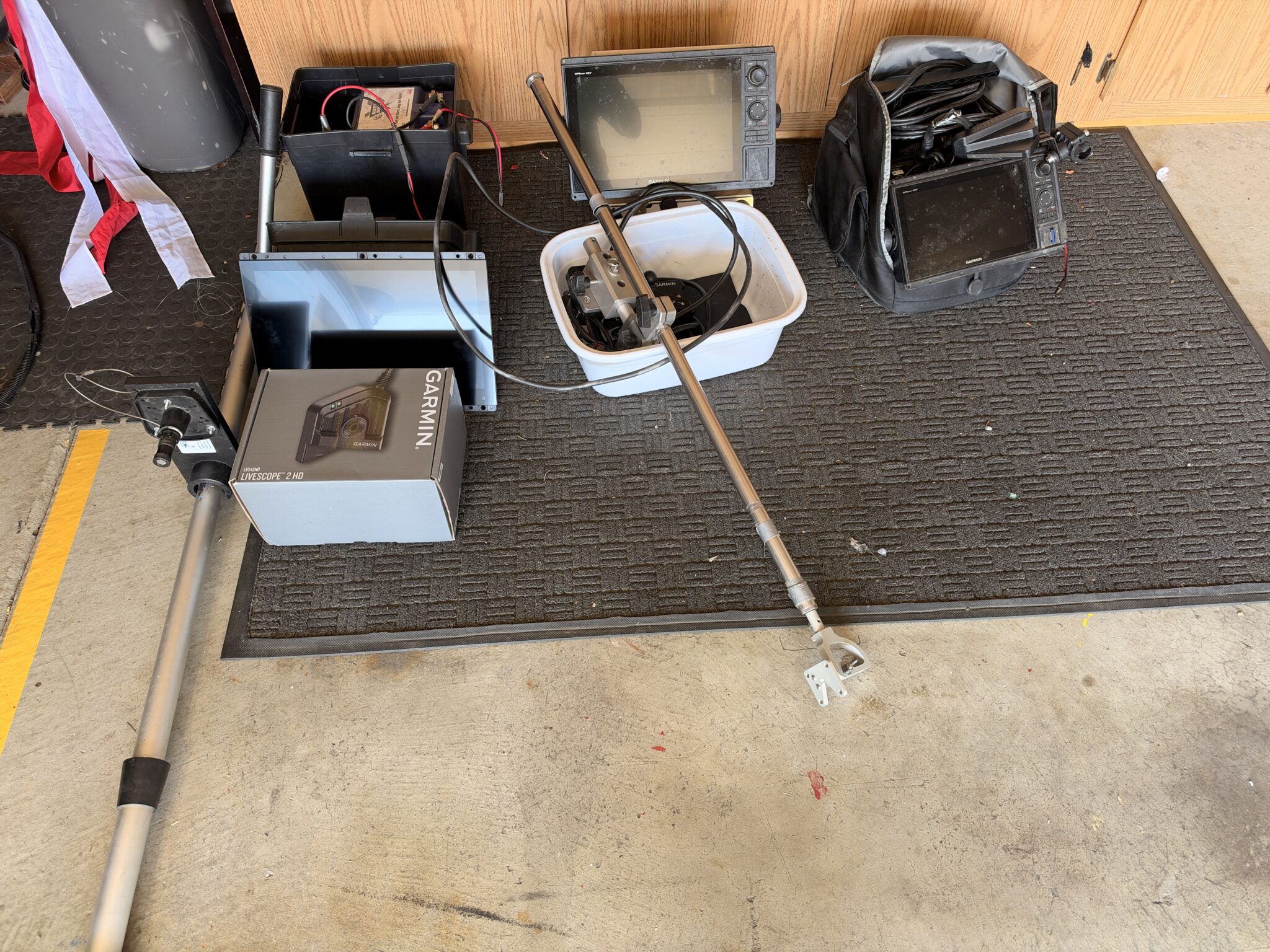
Last week, my new Garmin LiveScope 2 package arrived, and naturally, I couldn’t leave it sitting in the box. This is now the third generation of LiveScope I’ve owned. I moved my LVS34 onto my portable setup and passed my original first-generation unit along to Vaughn. The new system went straight into the boat. With the installation finished — or so I thought — I decided to take it out to the Forebay for a test run. There was just one minor concern: I hadn’t started the boat in four months. Anyone who owns a boat knows that letting it sit unused is practically an invitation for something expensive to go wrong. Boats don’t appreciate neglect, and four months without running the engine is pushing your luck.
I carefully launched, crossed my fingers, and turned the key. The engine fired right up and purred like a kitten. One less thing to worry about. Frank had called a couple of days earlier to tell me the Forebay was starting to blitz. That was encouraging, although I’ve always preferred fishing the big lake. The average fish tend to run larger, and there’s always the possibility of hooking something truly memorable.
Just last week, Roger George landed a personal-best 48-pound striper out of San Luis. Forty-eight pounds! That’s a fish that could rearrange your entire afternoon, not to mention your tackle. There are still some genuine monsters swimming around in that reservoir.
Fishing or Playing With Electronics?
I spent most of the morning and a good part of the afternoon doing what I apparently enjoy almost as much as fishing: playing with electronics. The new LiveScope is impressive, but getting everything dialed in took some experimenting. For starters, I’d managed to mount the transducer backward on its rotating pole. I also discovered a couple of other installation mistakes that needed correcting. Apparently, reading the instructions before installing something remains an option I haven’t fully embraced. The new 16-inch Garmin GPSMAP 1643xsv opens up a whole new world of possibilities. The display is enormous, and the ability to customize multiple sonar and navigation screens makes it possible to build a system around the way I actually fish. But the really interesting part is what I can connect to it.
I managed to hook up my XREAL augmented-reality glasses to the Garmin’s HDMI output. Suddenly, I could see my LiveScope display floating right in front of my eyes while wearing the glasses. Think about that for a moment. I can stand on the boat, cast a fly, and potentially watch fish moving underwater without constantly looking down at the fish finder. It still needs some tuning, but I’m excited about where this could go.
The Garmin also has a composite video input, which means I can connect an underwater camera and display its image on that beautiful 16-inch screen. Or, theoretically, I could connect a television source. Which means I could watch a football game on my Garmin while fishing. Now there’s a technological advancement nobody knew they needed.
Between LiveScope, augmented-reality glasses, underwater cameras, and the possibility of watching the 49ers while chasing stripers, I’m beginning to wonder whether I’ve built a fishing boat or a floating electronics laboratory. Too many toys. Not enough hours in the day.
Plenty of Fish, Just No Cooperation
Eventually, I remembered that the purpose of going fishing was actually to catch fish. From 9 in the morning until about 3 in the afternoon, I worked the Powerhouse, the Rocks, and the Tire Piles. Not a single bite. The frustrating part was that I could see fish on the new LiveScope in remarkable detail. They were down there, moving around, doing whatever stripers do when they’re determined to ignore a perfectly good fly.
Seeing fish and catching fish, as I’ve learned repeatedly over the years, are two entirely different things. By midafternoon, I’d covered nearly the entire Forebay without much to show for it. The only area I hadn’t explored was the Highway 152 channel. So I headed over for one last look.
And there they were.
Larger schools of stripers, although most were pretty small. Dinks, really, averaging around 15 inches. But after six hours of watching fish refuse my offerings, I wasn’t about to complain. Twenty-Five Fish in Two and a Half Hours. From about 3:00 until 5:30, the fishing finally turned on. I landed more than 25 stripers in those last two and a half hours. Nothing particularly impressive in size, but the action was steady, and after a long morning of tinkering with electronics and getting skunked, it felt awfully good to have a bent rod again. Most of the fish were around 15 inches, and only two were big enough to keep for dinner. Still, two fresh stripers for the table and a couple of dozen fish released isn’t a bad way to finish the day.
More importantly, the boat ran perfectly, the new Garmin system worked, and I got a chance to start learning what this latest generation of LiveScope can do. I also confirmed that no matter how sophisticated the electronics become, the fish still get the final vote.
Whoever said using LiveScope is cheating clearly doesn’t understand the difference between finding fish and catching them. LiveScope might show you exactly where the fish are, but convincing them to eat your fly is still an entirely different challenge. And believe me, I’ve spent plenty of hours staring at a screen full of fish that had absolutely no interest in what I was offering.
All in all, it was a pretty successful shakedown cruise. I worked out some installation mistakes, experimented with the new electronics, got the boat back on the water, and managed to catch a pile of fish before calling it a day. This coming weekend, I’m heading back to the big lake, where I’m hoping to find some larger stripers. Maybe even one of those monsters Roger George keeps reminding us are still swimming around out there. And if the fish aren’t biting, at least I’ll have plenty of new electronics to play with. Who knows? Maybe I’ll even catch a football game.
Building My Ultimate Striper-Finding System: Garmin GPSMAP 1643xsv and LiveScope 2
From searching to tracking to fishing — how I customized my new Garmin system for fly fishing striped bass at San Luis Reservoir.
I’ve been fishing San Luis Reservoir for years, chasing striped bass with a fly rod. Over that time, I’ve become increasingly fascinated with fish-finding technology, especially Garmin LiveScope which Ive been a fan of since day one. Being able to see fish swimming around underwater in real time has fundamentally changed how I approach fishing.
Recently, I upgraded my electronics to a 16-inch Garmin GPSMAP 1643xsv with the new LiveScope 2 LVS44 transducer. I already had considerable experience with Garmin electronics, but this was an opportunity to rethink how I use sonar rather than simply installing a bigger screen. I spent much of an afternoon in my garage exploring the menus, experimenting with settings, creating custom screen layouts, and figuring out how to integrate traditional sonar, SideVü, navigation charts, and LiveScope into one coordinated system. What emerged was a fishing strategy built around three simple steps:
Searching. Tracking. Fishing.
And the more I worked with the Garmin, the more I realized how powerful this arrangement could become.
The Hardware: A 16-Inch Window Into the Water
My new system consists of:
- Garmin GPSMAP 1643xsv, with its 16-inch touchscreen
- Garmin LiveScope 2 LVS44 transducer
- Garmin GT52HW transducer for traditional CHIRP, ClearVü, and SideVü
- A separate rotating pole for the LiveScope transducer
- Garmin navigation charts and waypoint management
- AR glasses connected to the Garmin display
The 16-inch display is a major improvement. It gives me enough real estate to run several sonar views simultaneously without making everything too small to interpret. I also got my AR glasses working with the Garmin, which is pretty remarkable. Having that large sonar display available through wearable glasses opens up some interesting possibilities while I’m standing on the boat casting. But the most important discovery wasn’t the hardware itself. It was how I could organize everything around the way I actually fish.
Step One: SEARCHING — Covering Water Efficiently
When I’m searching San Luis Reservoir, I’m usually looking for schools of striped bass suspended somewhere between 20 and 60 feet below the surface. These fish might be over much deeper water, following schools of threadfin shad. I like to cover water. My normal searching speed is around 5 to 10 mph, depending on conditions. Rather than constantly switching between sonar screens, I designed a custom combination called SEARCHING.
My layout:
| Screen position | Display |
|---|---|
| Left half | SideVü |
| Upper right | Fishing/navigation chart |
| Lower right | Traditional CHIRP sonar |
This gives me three different kinds of information simultaneously.
SideVü: Looking off to the sides
I use the GT52HW SideVü transducer at 455 kHz CHIRP for broader coverage. My initial setting will be approximately 100–150 feet on either side of the boat, adjusting according to depth and image quality. I’m not particularly interested in looking at rocks or submerged trees. I’m looking for schools of fish. SideVü lets me search water that my boat never actually passes over.
Traditional CHIRP: Looking directly below
Traditional sonar provides another important perspective. When I’m running over deep water, I can identify suspended schools and estimate their depth. For my fishing, I’m particularly interested in the upper 80 feet of the water column. If a school appears 35 feet down, that immediately tells me where I should concentrate my attention.
Fishing chart: Knowing where everything is
The third panel is my fishing chart. When I find something interesting on SideVü, I can select the school on the sonar image and create a waypoint at its estimated location. That waypoint then appears on my chart. Instead of blindly turning the boat around and hoping I find the school again, I have a reference point. Of course, stripers don’t stay put. The waypoint records where I saw them, not where they’ll necessarily be five minutes later. That’s when the second stage comes into play.
Step Two: TRACKING — Following the School
Once I’ve located a promising school, I slow down and switch to my second custom screen.
I named it TRACKING.
The layout is similar, but I replace SideVü with LiveScope.
| Screen position | Display |
|---|---|
| Left half | LiveScope Forward |
| Upper right | Fishing/navigation chart |
| Lower right | Traditional CHIRP sonar |
This is where the technology really becomes exciting. With the LVS44 mounted on its own rotating pole, I can aim LiveScope independently of the boat. I can scan left or right, find the school, and watch how the fish move. Are they traveling in one direction? Are they holding at a particular depth? Are they following bait? Are they scattering or bunching together?
Traditional sonar tells me what’s beneath the boat, but LiveScope lets me watch what’s happening in front of it. The navigation chart keeps me oriented, while traditional CHIRP confirms the depth of fish passing beneath the hull. Instead of driving over the school repeatedly, I can attempt to stay near it and follow its movement. Marking fish directly from LiveScope
One of the discoveries I made while experimenting in the garage was how to create a waypoint directly from the LiveScope screen. I touched the sonar image, which paused it and displayed a cursor. Then I noticed a small waypoint symbol with a plus sign in the upper-right corner. I tapped it. And there it was — a new waypoint. I could edit it, name it, or delete it. When I switched to my chart, the waypoint appeared. I even created a test waypoint while sitting in the garage, found it on the chart, and deleted it. That was pretty satisfying.
The Garmin did warn me that the LiveScope compass wasn’t calibrated and that it was using course over ground for cursor positioning.
Since the boat was sitting in my garage, that wasn’t surprising. I’ll calibrate the compass on the water with the transducer installed in its normal position. Once that’s done, I should have a more useful reference for marking fish positions from LiveScope while the boat is stationary or moving slowly.
Step Three: FISHING — Watching the Fly and the Fish
Once I’ve located the fish and positioned the boat, I don’t need three different sonar views competing for screen space. Now I want the largest possible LiveScope image. So my third combination is simply called FISHING.
My initial plan is to dedicate most of the 16-inch display to LiveScope, with a smaller chart panel for position and waypoint reference. I also created a separate full-screen LiveScope layout for situations where I want absolutely maximum image size. This is particularly important for fly fishing.
Unlike someone dropping a large jig or swimbait, I’m often fishing relatively small flies on sinking lines. I want to see the fly line descending through the water, identify fish near it, and hopefully observe their reactions. At longer distances, the fly line is considerably easier to detect than the fly itself. Still, watching the fish respond to a presentation is an extraordinary advantage.
Setting LiveScope range to match my casting distance
I came up with a simple idea for my Forward Range setting. Rather than using the maximum range available, I’ll set LiveScope to look just beyond my maximum practical casting distance. Why waste half the screen displaying water I can’t reach? If I’m casting 70 feet, I might set the forward range to approximately 80 or 90 feet.
That concentrates the available screen resolution on the water I’m actually fishing. For fish suspended 20 to 60 feet deep, I’ll adjust the depth range accordingly. The idea is to create a display that matches my fishing, rather than forcing my fishing to match the electronics.
An Unexpected Discovery: LiveScope Presets
This might have been the most useful discovery of the afternoon. Initially, I thought I could create separate LiveScope combinations for shallow and deep fishing, each remembering its own gain settings. I created two combinations and ran an experiment. I changed the gain in one combination, switched to the other, and checked the setting. It had changed there, too. I repeated the experiment. Same result. Apparently, those combinations were sharing the same LiveScope gain setting.
That was disappointing, because I wanted to optimize one setup for shallow water and another for deeper schools.
Then I discovered LiveScope Presets.
Now things got interesting. The Garmin offered several preset configurations, including Main Settings, Bait Balls, and Pro, along with the ability to create and manage presets. I created my own preset called Meng’s Settings. Under Manage, I found options to rename, edit, delete, and reset presets. And unlike the screen combinations, presets are designed to save sonar adjustments. This gives me a much more useful approach.
I can potentially create presets such as:
- Meng’s Settings: My everyday LiveScope configuration
- Shallow Stripers: Optimized for fish in shallower water
- Deep Stripers: Optimized for deeper schools
- Fly Tracking: Tuned to help reveal my sinking line and small flies
- Bait Balls: Optimized for identifying schools of shad
I’ll refine and save these configurations on the lake, where I can actually observe fish and evaluate the image. I don’t want to guess at settings while sitting in the garage.
Tuning LiveScope for Maximum Visibility
I’ve used the traditional amber color scheme for years. Bright targets against a black background are familiar and easy for me to interpret, even in strong sunlight. I experimented with the idea of changing to other palettes, including Lava, but ultimately decided to stay with amber. There’s something to be said for familiarity.
Gain versus color gain
These are two settings I want to experiment with carefully. Regular gain affects the sensitivity of the sonar image. Too little gain and I might miss weak targets. Too much and the screen becomes cluttered. Color gain affects how strongly sonar returns are emphasized by the selected color palette. For my fishing, I want fish to stand out clearly without losing weaker returns from my fly line.
Color limit.
I also examined the Color Limit setting. Increasing it suppresses weaker returns and can produce a cleaner-looking display. But there’s a tradeoff. Those weak returns might include the very things I’m trying to see. For now, I’ve left Color Limit at zero. I’ll experiment with it when I’m actually fishing.
Auto Stabilize and Focus
I left Auto Stabilize enabled to help compensate for the movement of the boat and transducer. For Focus, I selected Auto Fresh, since nearly all my LiveScope fishing is in freshwater. Again, the real test will be on San Luis Reservoir.
Why I Mounted LiveScope on a Separate Rotating Pole
I prefer having LiveScope on its own rotating pole rather than attached directly to a trolling motor. It allows me to point the transducer wherever I want without changing the boat’s direction. I prefer to have the transducer where I cast from . When a school appears off the starboard side, I can simply rotate the pole. If the fish move around the bow, I can follow them.
I’m using the original Garmin mounting bracket, and I spent some time studying the correct Forward Mode orientation. One confusing aspect is that the transducer housing and cable direction don’t necessarily look intuitive when the unit is mounted. The correct alignment depends on the bracket position and Garmin’s mounting marks, not simply which direction the cable points. Using a white ink pen I added some clear directional indicators on the adjustment knobs. so I always know exactly where LiveScope is looking. That should make tracking moving schools considerably easier.
Saving Sonar Screenshots With Fishing Information
Another feature I explored was screenshot capture. On the GPSMAP 1643xsv, holding the Home button saves a PNG image of the display. I discovered that I could review these images using the Garmin’s Image Viewer and delete them individually. I also found the microSD card access door. My plan is to create screenshots that include both sonar information and useful navigation data. Ideally, each screenshot will show:
- The school of fish on SideVü or LiveScope
- The navigation chart and boat position
- Water depth
- Water temperature
- GPS coordinates when displayed
That way, a screenshot becomes more than a pretty sonar picture. It becomes a fishing record. I could review it later and remember the conditions under which I found a particular school. The PNG itself isn’t necessarily GPS-geotagged like a smartphone photo, so displaying coordinates on the screen and saving a waypoint are important. I can also copy the screenshots to my Mac and keep them with my fishing journal.
One More Combination: STRUCTURE
Although most of my San Luis fishing involves suspended stripers in open water, I also created a fourth type of display called
STRUCTURE.
This combination will include ClearVü, SideVü, and my navigation chart. ClearVü is fundamentally different from LiveScope Down. ClearVü produces a scrolling sonar history as the boat moves, making it useful for interpreting bottom structure and objects. LiveScope Down provides a real-time view of fish and objects beneath the transducer. Both have their uses. For my primary style of striper fishing, LiveScope is more important. But I still want the option of exploring submerged terrain, drop-offs, and other structural features.
My Final Garmin Screen Organization
After experimenting with different combinations, this is the system I settled on for my initial on-water testing.
| Combination | Purpose |
|---|---|
| SEARCHING | SideVü + fishing chart + traditional CHIRP |
| TRACKING | LiveScope Forward + fishing chart + traditional CHIRP |
| FISHING | Large LiveScope view + smaller fishing chart |
| LIVESCOPE FULL SCREEN | Maximum detail for observing fish and fly |
| STRUCTURE | SideVü + ClearVü + fishing chart |
The separate LiveScope presets will handle the differences between shallow water, deep water, bait schools, and fly tracking. That’s a much better arrangement than creating a dozen different screen combinations.
The Real Test Comes Tomorrow
All of this experimenting happened in my garage. I even dipped the transducer into a container of water so I could access settings that weren’t available when the Garmin reported that water wasn’t detected. But configuring sonar without fish is a little like tuning a fly rod without ever casting it. You can get close, but you don’t really know how everything will perform until you’re on the water. Tomorrow, I plan to take the boat to San Luis Reservoir and start putting this system through its paces.
I’ll begin by searching open water with SideVü and traditional CHIRP. When I find a school, I’ll mark its position, slow down, and switch to Tracking. Then I’ll use LiveScope to follow the fish, determine their depth and direction, and position the boat for a cast. Finally, I’ll switch to Fishing, bring up the large LiveScope image, and watch what happens when I send a fly toward the school. Along the way, I’ll experiment with gain, color gain, range, and presets until I find settings that work best.
Final Thoughts: Fishing With a Plan
The biggest lesson from this afternoon wasn’t learning where Garmin hid another menu option. It was realizing that modern fish-finding electronics work best when they’re organized around a fishing strategy. For years, fishermen have searched for fish using depth finders, maps, experience, and instinct. LiveScope adds an entirely new dimension: the ability to watch fish move and react in real time. But it doesn’t replace the need to locate them in the first place.
That’s why I like this three-stage approach.
SEARCHING finds the fish.
TRACKING follows the fish.
FISHING lets me present the fly and watch what happens.
With a 16-inch Garmin display, SideVü, traditional CHIRP, LiveScope 2, and a rotating transducer pole, I now have the tools to do all three without constantly fighting the electronics. And for someone who has spent a lifetime trying to understand what striped bass are doing beneath the surface, that’s pretty exciting. Now I just need the fish to cooperate.


