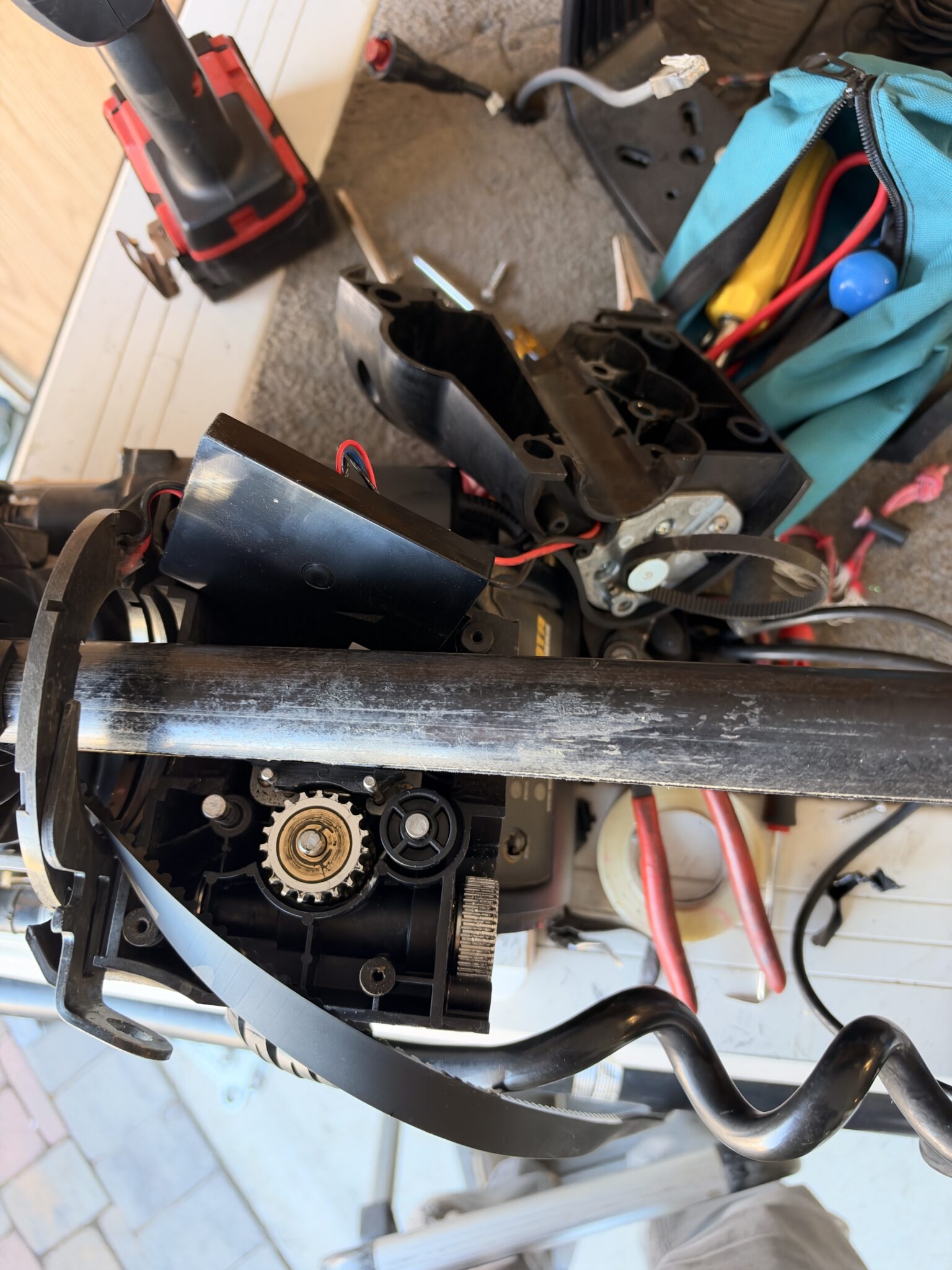
The last time I was out on the lake, I noticed my Minn Kota Ulterra was starting to act up. It was struggling to deploy, sometimes refusing to budge until I hit the deploy button three or four times. Other times, it would shudder and groan while trimming. I recognized the symptoms immediately. The damn thing was getting old. Just like me. I checked my records (this blog is basically my memory these days) and realized I’d bought and installed the Ulterra back in 2016. Ten years old! No wonder it was struggling. Its shoulder wasn’t working right, and its rotator cuff was probably shot. I could relate. And here’s the problem: I can’t fish without this motor. I’ve become completely dependent on automatic deployment and Spot-Lock. The idea of manually dropping an anchor or wrestling a trolling motor over the bow seems downright primitive.
Duct Tape: The Universal Repair Kit
Earlier this year, the lift belt broke right beneath the head unit. Now, a reasonable person would have ordered a replacement belt immediately. I am not that person. I grabbed some duct tape, secured the broken belt to the shaft, managed to stow the motor, and headed home. Problem temporarily solved. Once home, I started watching YouTube videos on how to replace the belt. Most rated the repair a 7 or 8 out of 10 in difficulty. Wonderful.
The videos showed guys taking apart the head unit, removing the upper belt attachment, disassembling the trim mechanism to thread the belt around the gears, removing the lower belt cowling, and then performing some complicated belt-tensioning procedure that looked like it required a mechanical engineering degree. Meanwhile, my duct tape was working just fine. So I did what any experienced fisherman and accomplished procrastinator would do.
Nothing.
For two months. The motor kept working, and I figured why spend twenty bucks on a new belt when I already had a perfectly good roll of duct tape? Eventually, I decided to upgrade my repair from temporary to semi-permanent. I drilled a hole and riveted the broken belt directly to the shaft. There. Fixed. And the amazing thing is, it actually worked! For months! I was feeling pretty smug about my engineering skills until this past weekend, when the Ulterra started acting up again. Apparently, even trolling motors eventually get tired of being held together with duct tape and rivets.
I finally broke down and ordered the twenty-dollar replacement belt, hoping a little mechanical Viagra might put some spring back into the old girl’s stow-and-deploy performance. Ten Years of Forebay Archaeology. The first thing I discovered after removing the side covers and the top of the head unit was that my Ulterra had become a wildlife sanctuary. There were entire communities of insects living inside. Large, fossilized chunks of O’Neill Forebay weeds. Layers of dried San Luis Reservoir algae stacked about ten deep. I half expected to find dinosaur bones. Apparently, ten years of fishing at San Luis leaves a few souvenirs behind. I decided that if I was going to do this job, I might as well do it right.
I disassembled practically every moving part I could find, cleaned everything, and lubricated the appropriate components. Next came the shaft. For years, my maintenance program consisted of occasionally spraying a little WD-40 on it and declaring victory. Turns out, Minn Kota doesn’t recommend that. WD-40 can attract dust and debris, eventually turning the shaft into a sticky collection of everything the Forebay has to offer. Their recommendation? Pledge furniture polish for the shaft and graphite lubricant where appropriate. Pledge! Apparently, my trolling motor needed housekeeping more than mechanical repair. Fortunately, everything looked pretty good. No broken components, no obvious damage, and a nice smooth shaft.
The $20 Belt From Hell
Now came the real challenge: getting the new belt through the trim motor gears. The first YouTube video I followed demonstrated what I now know was probably the most difficult way imaginable.
The guy recommended disconnecting both ends of the belt, removing the trim motor assembly, and taking the whole thing apart to thread the replacement belt directly around the gears. Sounded simple enough. Four screws. How hard could it be? I removed the last screw. BOING! A spring launched itself across the room. Wires popped out of the housing. Plastic pieces shifted around. Suddenly, I was staring at a pile of components that had apparently been assembled by someone with six hands and a PhD in mechanical engineering. It was like trying to put a scrambled egg back into its shell.
I spent the next several hours figuring out where everything belonged, wondering whether the spring was actually necessary, and contemplating whether a brand-new trolling motor might have been the smarter investment. The Garmin Kraken $5000 dollar price tag made me reconsider the option and try a bit harder. On the bright side, I got to clean the inside of the trim assembly. On the downside, I was beginning to understand why Minn Kota repair technicians charge actual money.
By this point, I’d spent about seven hours watching YouTube videos, crawling around the motor, studying the mysterious red and green lights on the logic board, and trying to figure out what the two cradle switches actually did. Left Rocker switch tells motor that its at limit of stow position. Right Magnet Switch is a proximity switch tells motor logic that motor is going to horizontal in an intermediate position near full stow to start trim retraction into cradle.
According to Ulterra. On deploy, the shaft extends five to six inches before pivoting vertical. When stowing, it rises until the lower unit is twelve to thirteen inches below the base before pivoting horizontal. These transitions (rises and extensions) are based on the count by the trim module logic. If these actions fail, a reset is needed to retrain the trim module logic. These positions are not controlled by the magnetic switches (Hall Effect proximity sensors). The magnetic sensors control the actual pivot logic.
Finally, Somebody Who Knew What He Was Doing
Eventually, I stumbled across a YouTube video by a Minn Kota repair guy who actually seemed to know what he was doing. You know there are literally 100s of videos out there of people like me trying to be helpful and some just posting fucked up motors and asking anybody for help. And within a few minutes, I realized something horrifying. I’d replaced the belt the hardest way possible. The easy way was to use the Ulterra’s own powered trim motor to pull the replacement belt through the gears. That’s it. No need to disassemble the trim motor. No flying springs. No wires jumping out of the housing. No seven-hour mechanical adventure. Just feed the new belt into the opening and let the motor do the work.
I stared at the screen. You’ve got to be kidding me. Of course, by this time, I’d already installed the belt using the hard way. But the video revealed something even more important. The Ulterra needed to be retrained. Apparently, after certain repairs, the motor can lose track of its trim positions. It doesn’t know whether it’s stowed, deployed, or somewhere in between.
The magic trick was to disconnect the deployment screw drive, manually lower the motor into its vertical position, and then perform the electronic trim reset. You cant if the motor is stowed or undeployable. Once the reset was completed, you could return the motor to the position of the screw drive, reconnect everything, and command it to stow and deploy normally. Suddenly, all those mysterious lights and switches started making sense.
Twenty-Five Hours Later…
After countless YouTube videos, several mechanical disassemblies, a missing spring, a few dozen failed deployment attempts, and enough colorful language to embarrass a commercial fisherman, I finally got everything working. Total time invested? Twenty-five hours. To replace a twenty-dollar belt. That’s eighty cents an hour. I could have worked one extra day at the dental office, bought a brand-new Ulterra, and still had enough money left over for lunch. But where’s the fun in that?
The good news is that I now understand this trolling motor better than I ever did during the ten years I’ve owned it. I know how the deployment screw drive works, how the trim mechanism feeds the belt, what those mysterious cradle switches do, and how to reset the electronic trim positions. And best of all, the Ulterra is back in action. No more shuddering. No more refusing to deploy. No more hitting the button four times and praying. If only fixing my own rotator cuff were that easy.
The Moral of the Story
If your older Minn Kota Ulterra starts struggling to deploy, don’t immediately assume it’s worn out. It might just need a new belt, a good cleaning, and an electronic trim reset. And whatever you do, watch the right YouTube video BEFORE you take the trim motor apart. Trust me on that one.
Below is the step-by-step procedure I wish I’d known before beginning this adventure. It might save you twenty-four hours of frustration, several hundred swear words, and an unnecessary search for a spring somewhere on your garage floor.
Step-by-Step: The Easy Way to Replace an Ulterra Belt and Reset the Motor
This procedure is for my older-generation Minn Kota Ulterra, purchased in 2016. Newer models may have different mechanisms and reset procedures. The secret is to use the trim motor to feed the replacement belt through the gears rather than disassembling the entire trim assembly. Equally important is getting the motor into the correct position before resetting its electronic trim limits.
The following combines the repair technique demonstrated in the YouTube video that finally saved me with the older Ulterra’s trim-reset procedure. The mechanical belt-feeding and screw-drive release steps are based on my interpretation of that demonstration, so verify them against the video before attempting the repair.
Step 1 — Remove the Covers and Inspect Everything
- Turn the Ulterra OFF and disconnect the 24-volt power supply.
- Remove the side covers from the mounting base and the cover from the head unit.
- Inspect the belt, shaft, trim mechanism, and deployment screw drive.
- Remove accumulated dirt, weeds, algae, and other debris.
- Clean the shaft. Minn Kota recommends Pledge furniture polish for the shaft rather than WD-40.
- Inspect the belt attachments and lubricate only the components specified by Minn Kota.
Tip: Take pictures before disconnecting anything. Those pictures are worth their weight in gold when you can’t remember where a spring or wire belongs.
Step 2 — Release the Deployment Screw Drive
If the motor is partially stowed or cannot move into the vertical deployed position:
- Locate the retaining arm with the plastic cap that captures the deployment screw drive.
- With power disconnected, lift the arm and disengage the screw-drive connection.
- Carefully swing the trolling motor into its vertical deployed position.
- Leave the screw drive exactly where it is. It may remain halfway through its deployment travel.
- Make sure the motor is securely supported.
Important: The deployment screw drive and the vertical trim mechanism perform different jobs. Releasing the screw drive allows you to position the motor vertically without forcing the deployment mechanism.
Step 3 — Remove the Old Belt Using the Trim Motor
- Disconnect the broken belt from the upper attachment beneath the head unit.
- Disconnect the lower attachment near the propeller motor.
- Remove any loose belt fragments.
- With the motor vertical, confirm that the trim mechanism is free to operate.
- Restore power, keeping hands and tools away from moving components.
- Use the appropriate trim command to drive the old belt out through the housing.
- Stop once the old belt is completely removed.
The direction used to eject the old belt should be confirmed against the video before operating the motor. The trick: You don’t have to take the trim motor apart to remove the belt. Let the gears do the work. Turn the power OFF and disconnect it again before inserting the replacement belt.
Step 4 — Feed the New Belt Through the Trim Mechanism
This is the step I wish I’d known about before taking everything apart.
- Position the new belt at the upper opening beneath the head unit.
- Bend the leading end as demonstrated in the video so it can enter the opening and engage the trim-drive gears.
- Feed the leading end into the housing with the power disconnected.
- Make sure the belt is correctly oriented and not twisted.
- Move your hands and tools away from the belt and gears.
- Restore power and use Trim Up, after confirming that this is the correct feed direction for your motor.
- Allow the trim mechanism to pull the replacement belt through in short increments.
- Stop when enough belt emerges to connect the lower attachment.
If the belt doesn’t feed smoothly, stop, disconnect power, and inspect the alignment. Don’t force it or try to guide it with your fingers while the drive is running. No disassembly of the trim gearbox required. No flying springs. No four-letter words. Well, maybe fewer four-letter words.
Step 5 — Attach and Tension the New Belt
- Turn the motor OFF and disconnect power.
- Secure the belt to its lower attachment near the propeller motor.
- Secure the upper attachment beneath the head unit.
- Verify that the belt is properly seated throughout its path.
- Adjust belt tension according to Minn Kota’s instructions for your model.
- Inspect both attachment points and check for twisting or binding.
Do not overtighten the belt. Proper tension is important for smooth trimming and long belt life.
Step 6 — Position the Motor for the Electronic Reset
Here’s another critical step. The motor needs to be in its correct vertical deployed configuration before performing the trim-count reset. If the deployment screw drive was disconnected earlier, leave it disengaged for now.
- Make sure the trolling motor is vertical.
- Confirm that the new belt is attached and tensioned.
- Verify that the shaft and trim mechanism can move without interference.
- Make sure the motor is properly supported.
- Reconnect the 24-volt power supply.
Don’t try to force the screw drive into position to make the motor vertical. That’s the whole reason for releasing it in the first place.
Step 7 — Perform the Electronic Trim Reset
For the older Ulterra trim-count reset procedure:
- Turn the motor OFF using the power button on the mounting base.
- Wait until the green System Ready light is OFF.
- Turn the motor ON.
- Confirm the green light illuminates.
- Wait approximately 3 seconds.
- Press the power button three times rapidly within 2 seconds.
- The red and green LEDs should begin flashing.
The motor should now begin its automatic calibration sequence.
During calibration, the motor normally:
- Orients the steering assembly.
- Trims upward toward the steering housing.
- Reverses and trims downward approximately 6 inches.
- Stops when the calibration sequence is finished.
Successful reset: The red light goes out and the green System Ready light remains solid.
If the motor binds, stops unexpectedly, or fails to complete calibration, don’t keep repeating the reset. Investigate the mechanical position, belt installation, and sensors first.
Step 8 — Reconnect the Deployment Screw Drive
After the reset is complete:
- Turn the motor OFF.
- Wait for the green light to go out.
- Disconnect the 24-volt power.
- Release the bracket holding the motor in its deployed position.
- Carefully swing the motor back toward the partially stowed position corresponding to the screw drive’s current location. it can even be in the stow position.
- Align the screw-drive connection with the retaining arm.
- Reinstall the plastic cap and secure the retaining arm.
- Confirm that everything is fully engaged.
Do not force the screw drive or retaining arm. The components should align properly before the motor is powered.
Step 9 — Stow and Deploy to Verify the Repair
Now comes the moment of truth.
- Reconnect the 24-volt power.
- Turn the Ulterra ON and confirm the green light illuminates.
- Issue a STOW command using the remote.
- Watch the motor move into its cradle.
- Confirm that the motor reports it is stowed.
- Issue a DEPLOY command.
- Watch the motor move outward, pivot vertically, and trim downward.
- Confirm that the motor reports it is deployed.
- Test Trim Up and Trim Down.
If everything operates smoothly without hesitation, binding, or error lights, the repair is complete.
Step 10 — Final Inspection
Before putting the covers back on, verify:
- Belt is properly attached at both ends.
- Belt tension is correct.
- Belt travels smoothly through the trim mechanism.
- . Deployment screw drive is fully engaged.
- . Plastic retaining cap is secured.
- . Electronic trim reset completed successfully.
- . Red error light is off.
- . Green System Ready light is solid.
- . Motor stows and deploys normally.
- . Trim Up and Trim Down work correctly.
Turn the motor off and disconnect power before reinstalling any covers.
A Few Final Words
Looking back, this should have been a relatively straightforward repair. Instead, I spent twenty-five hours figuring out how to do a job that probably could have been completed in a fraction of that time if I’d found the right video first. The two biggest lessons were simple:
First: Don’t disassemble the trim gearbox just to install the belt. The powered trim mechanism can feed the replacement belt through the housing.
Second: If the motor is stuck partially deployed, you may need to disengage the deployment screw drive and manually position the motor vertically before performing the electronic trim reset.
Once the trim calibration is complete, reconnect the screw drive and test the normal stow-and-deploy sequence. Hopefully, this saves somebody else from making the same mistakes I did. And if you happen to find a small spring flying across your garage, I know exactly where it came from.


